


AutoSync ™
AutoSync ™ enables automatic synchronization of data from all navigation displays across a single farm. Such data includes: machine navigation lines, field names and boundaries, landmarks, as well as information for each operator.
Thanks to this feature, the need for manual data entry and transfer, which was previously done via USB, is eliminated.
AutoSync ™ helps eliminate the possibility of information duplication and removes the human error factor. This is achieved through automatic minute-by-minute synchronization of information received from the field and the operator, using the Trimble Ag mobile application.
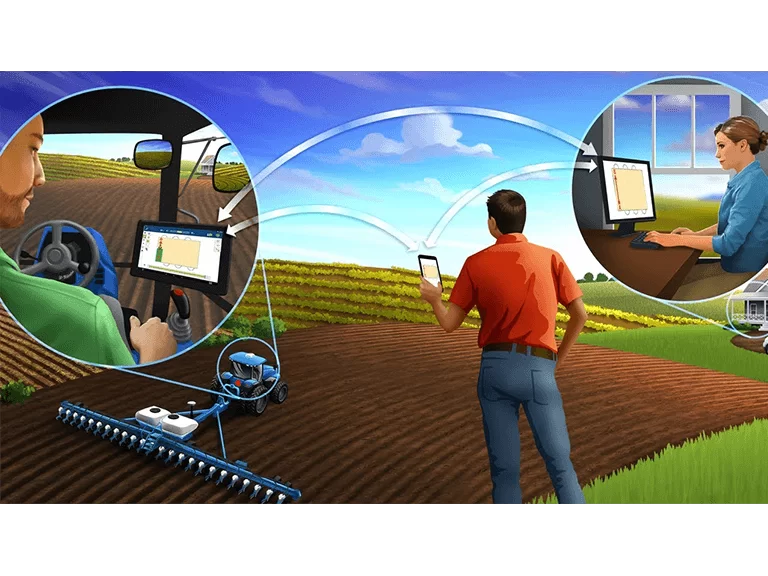
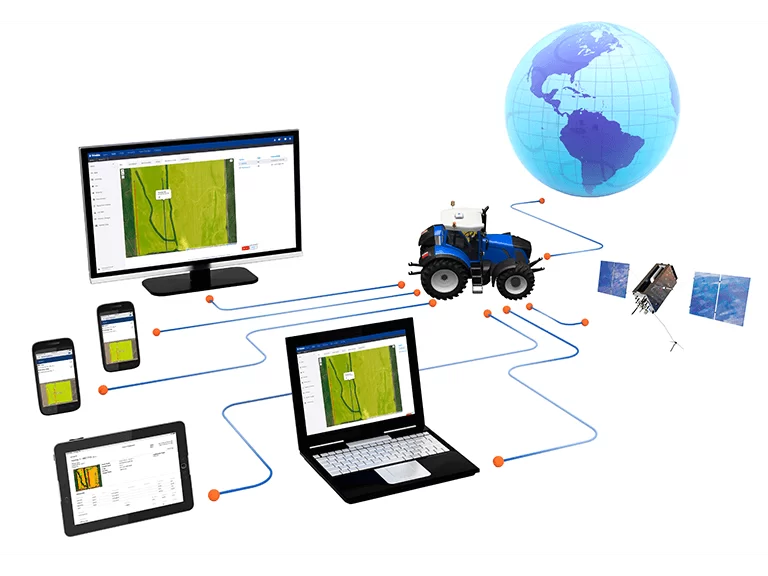
Features:
- Create, edit, and delete data online – data synchronization across all connected devices, on the computer or mobile device with Trimble Ag
- Create, edit, and delete data in Precision-IQ on the display – online synchronization and with all connected devices
- Manage task data in Precision-IQ on the display – online synchronization
- Delete data in Precision-IQ on the display – the information will be deleted online and on supported displays within the organization
Advantages

Easy setup – Setting the user, farm and field name, importing or drawing field boundaries, and generating a map can all be done via the mobile app.
Time savings – By synchronising and saving guidance lines across all connected devices, the risk of duplicating or re-entering information is eliminated.
Improved work efficiency – Setting up and sending guidance lines happens for all operators at the same time, which supports more efficient work, synchronisation and a smooth workflow.
Eliminating the "human error" factor – With AutoSync™, synchronisation is achieved and human errors caused by re-entering guidance lines, field names, boundaries and landmarks are eliminated.
Two-way data transfer – Thanks to AutoSync and Trimble Ag, reliable two-way data transfer is achieved.
Contact us


