FarmTrack mobile app - what are the new features since the last update?

The new year has also brought novelties in mobile applications for precision farming. In the last days of 2021, the mobile application of the platform for tracking and analyzing data from agricultural machinery — FarmTrack, was updated. In addition to a fresh new look of the application itself, the update also brought functionalities that make it even easier for users. Here's who they are:
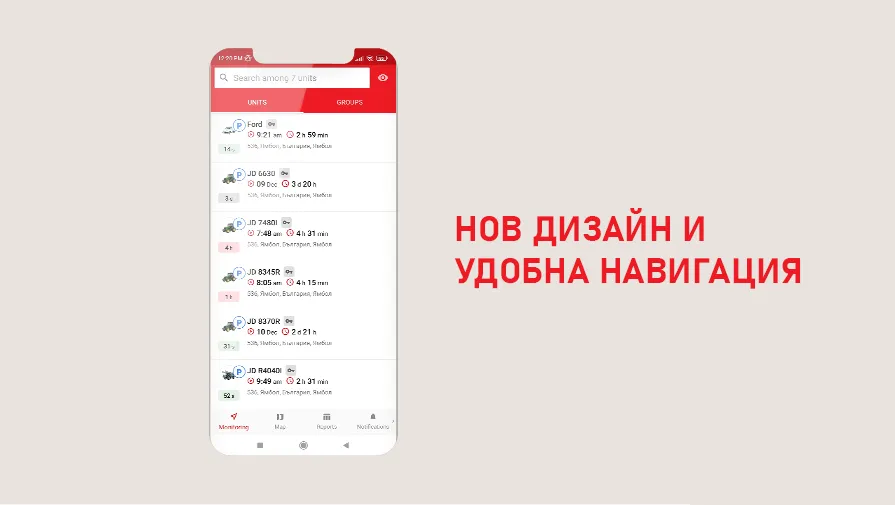
New design and convenient navigation
As we mentioned at the beginning, the FarmTrack application now has a new and more modern design, responding to the latest trends in mobile applications. Also, the app now has even more convenient navigation. Switching between screens is now done with just one tap. With this novelty, time is saved for all users.
Working with groups of devices
Users of the application can send commands to groups of devices and search by group name.
Search for a device directly on the map
After the last update, a device can now be found through the search box and positioned directly on the map. This is convenient because you do not need to change the size of the card or scroll when searching for a specific device.
Better management of notifications
Reports screen
Users of the FarmTrack mobile app can generate reports by selecting a device, report name and period. Export to PDF has also been added — it is no longer necessary to use the WEB version of FarmTrack to run a report. Users receive and send the analytical data in the field, on the road or wherever they are at the moment.
Information messages about the account
Now the application receives and displays the information messages from the CMS system. So you won't miss anything important, like the payment deadline, for example.
New Screen for Geozones
FarmTrack Mobilenow has a new screen for viewing, creating, editing and deleting geozones. These operations can now also be done through the mobile interface, which is convenient when we do not have access to the desktop version of FarmTrack.

On the new screen we can:
- we view the geozones on the map;
- we are looking for the geozone by name;
- create new geozones and associate notifications to them;
- we edit, copy, delete geozones;
- we adjust the visualization of geozones;
- we navigate to the geozone through Maps, Waze, etc.
What else is available in the FarmTrack app
- Selecting a card type directly from the map menu, without resetting the app
- Create geozones directly from the map, by holding a specific location, entering a name and recording
- Status screen — display of summary information about devices in the form of a dashboard. Makes it easy to keep track of many machines.
- Flexible interface settings — ability to hide unnecessary or rarely used screens/ by disabling from Settings/
Learn more about the FarmTrack mobile app — HERE
Other articles
Field Innovations: Chomstil is among the first farms in Bulgaria with a Kverneland Alentix spreader
.webp)